Phenix.Oncs.49.0
PHENIX On-Line Main Magnet Controls
April 2, 1999
Ed Desmond
Summary
The following technical note describes PHENIX online system Main Magnet controls.
System Overview
The PHENIX Main Magnets consists of three magnets, the North , South and Central Magnets. Each magnet is controlled by a separate magnet power supply and integrated controller. The magnet power supplies were manufactured by InvarPower Controls Ltd. Ontario, Canada. The integrated power supply controller contains an embedded processor through which control and system monitor commands may be issued. Access to these integrated controllers is through an RS422 serial interface. One RS422 serial interface exists for each power supply. Each controller accepts serial ASCII commands for setting the magnets voltage, current, ramp rate as well as providing on and off commands. Other commands exist to monitor the setpoint and output voltage and current parameters and system faults.
The PHENIX Online controls for this system consists of a Pentium PC running the NT operating system. Server software resident in this machine accepts commands from remote clients to monitor and control the magnets. A monitoring and control application which was written in Java is available for control of the magnets. This application is available by invoking the command "magnetviewer" from the Online bin directory. This directory is defined by the environment variable "ONLINE_BIN". Other client applications may be written in either C++ or Java to access the main magnets. Access is through a public CORBA interface.
Main Magnets System Description
The PHENIX main magnets consists of a North , Central and South magnet. Each magnet is independently controlled by a separate power supply which is located in building 1008B. This building is located outside the RHIC ring behind the main PHENIX experimental hall. Each power supply contains an integrated controller which provides for remote computer control through a single RS422 serial interface. The power supply controller supports commands for monitoring and control of the magnets voltage, current, ramp rate, status and faults. The magnet command set is contained in Table 1 below. The status values are contained in Table 2.
Magnet Command Set
|
function |
command |
format |
range |
|
Voltage setpoint |
VC |
volts |
|
|
Current setpoint |
IC |
Amps |
|
|
Voltage ramprate |
VR |
Volts/sec |
|
|
Current ramp rate |
IR |
Amps/sec |
|
|
System stop |
FF |
|
|
|
System start |
ON |
|
|
|
System Reset |
ZZ |
|
|
|
Ramp Start |
UP |
|
|
|
Ramp Stop |
DW |
|
|
|
Output voltage readback |
VO |
Volts |
|
|
Output current readback |
IO |
Amps |
|
|
Voltage setpoint readback |
VS |
Volts |
|
|
Current setpoint readback |
IS |
Amps |
|
|
Voltage ramp readback |
RV |
Volts/sec |
|
|
Current ramp readback |
RI |
Amps/sec |
|
|
Faults readback |
FL |
48 char |
|
|
Status readback |
ST |
6 char |
|
|
Power on/off readback |
PW |
1 char |
|
Table 1.
SOFTWARE SYSTEM COMPONENTS
The PHENIX Online magnet control software includes a server application which runs in an PC running Microsoft NT. This PC is located in the PHENIX counting house electronics room in building 1008. The server software exists as an NT service which starts automatically when the PC is booted. The server creates one software component or object for each magnet. There is one for the North , central and south magnets. Each magnet object contains functions which support all the power supply control commands. In addition, the server application continuously monitors the magnet power supply to obtains its latest voltage, current, and status information. This information is monitored at a 5 Hz rate. This information, as well as all supported commands are available from remote client applications. All functions for the magnet objects are available via a CORBA compliant interface. This interface is defined in an IDL file "magnets.idl" which resides in the Online IDL directory. This directory is accessed via the environment variable "IDL_MAIN". The interface functions are defined in the section below. Client applications may be written in either C++ or Java. Java applications may execute anywhere the Java runtime software environment is installed. C++ applications may run on any Online supported platform in the counting house or other location where the Orbix runtime libraries are installed.
Software interface functions
// GET METHODS
float getVoltageSetPoint();
float getCurrentSetPoint();
float getVoltage();
float getCurrent();
// Set Methods
void setVoltage( in float volts);
void setCurrent( in float amps );
void setvoltRampRate( in long rate);
void setcurrentRampRate( in long rate);
// Commands
// connect to the serial port
long connectPort(in string portname);
long RampStart();
long RampStop();
long Reset();
long Start();
long Stop();
void getStatus (out seqString status ); // status
// system faults
void getFaults(out seqString faults);
Status
Each magnet returns the following status values in response to a status readback command.
|
Status Description |
Status Functions |
Status Value |
|
Control mode |
Remote / Local |
0 / 1 |
|
Operating Mode |
Current / Voltage |
0 / 1 |
|
On |
On/ off |
1 / 0 |
|
Contact Position |
Open /closed |
0 / 1 |
|
Fault status |
Fault / no fault |
0 / 1 |
Faults
If a fault occurs in a magnet a magnet status field will indicate that a fault has occured.
Magnet faults are read back from the magnet power supply controllers upon command. The magnet faults are returned from the magnets as an array of bits which are on = 1 for a fault and off ( 0 ) for no fault.
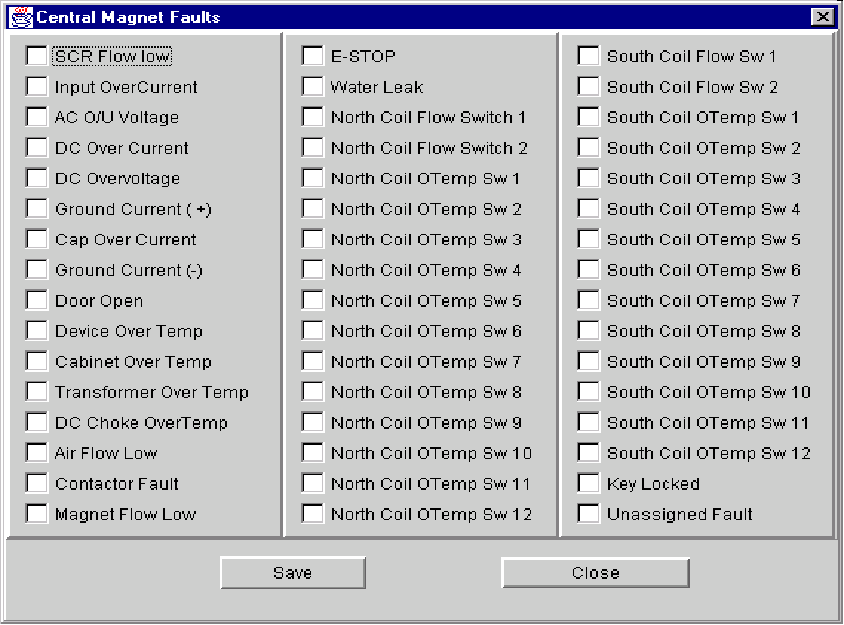
The faults that are read back can be displayed in a fault dialog box. They can also be saved in a file.
The saved values will include the status of each fault bit and the time at which the fault occurred.
A subset of the faults may be reset remotely. These faults are indicated by an "*" following the fault name.
|
North |
Central |
South |
|
SCR Flow Low |
SCR Flow Low |
SCR Flow Low |
|
Input Over Current |
Input Over Current |
Input Over Current |
|
AC Over/ Under Voltage |
AC Over/ Under Voltage |
AC Over/ Under Voltage |
|
DC OverCurrent |
DC OverCurrent |
DC OverCurrent |
|
DC Over Voltage |
DC Over Voltage |
DC Over Voltage |
|
Ground Current Fault P |
Ground Current Fault P |
Ground Current Fault P |
|
Capacitor Over Current |
Capacitor Over Current |
Capacitor Over Current |
|
Ground Current Fault N |
Ground Current Fault N |
Ground Current Fault N |
|
Door Open Fault |
Door Open Fault |
Door Open Fault |
|
Device Over Temperature |
Device Over Temperature |
Device Over Temperature |
|
Cabinet Over Temperature |
Cabinet Over Temperature |
Cabinet Over Temperature |
|
Transformer Over Temperature |
Transformer Over Temperature |
Transformer Over Temperature |
|
DC Choke Over Temperature |
DC Choke Over Temperature |
DC Choke Over Temperature |
|
Air Flow Low |
Air Flow Low |
Air Flow Low |
|
Contactor Fault |
Contactor Fault |
Contactor Fault |
|
Magnet Flow Low |
Magnet Flow Low |
Magnet Flow Low |
|
E stop Fault |
E stop Fault |
E stop Fault |
|
Water leak Fault* |
Water leak Fault* |
Water leak Fault* |
|
North Coil Flow Switch 1* |
North Coil Flow Switch 1* |
North Coil Flow Switch 1* |
|
North Coil Flow Switch 2* |
North Coil Flow Switch 2* |
North Coil Flow Switch 2* |
|
North Coil Over Temperature Switch 1* |
North Coil Over Temperature Switch 1* |
North Coil Over Temperature Switch 1* |
|
North Coil Over Temperature Switch 2* |
North Coil Over Temperature Switch 2* |
North Coil Over Temperature Switch 2* |
|
North Coil Over Temperature Switch 3* |
North Coil Over Temperature Switch 3* |
North Coil Over Temperature Switch 3* |
|
North Coil Over Temperature Switch 4* |
North Coil Over Temperature Switch 4* |
North Coil Over Temperature Switch 4* |
|
North Coil Over Temperature Switch 5* |
North Coil Over Temperature Switch 5* |
North Coil Over Temperature Switch 5* |
|
North Coil Over Temperature Switch 6* |
North Coil Over Temperature Switch 6* |
North Coil Over Temperature Switch 6* |
|
North Coil Over Temperature Switch 7* |
North Coil Over Temperature Switch 7* |
North Coil Over Temperature Switch 7* |
|
North Coil Over Temperature Switch 8* |
North Coil Over Temperature Switch 8* |
North Coil Over Temperature Switch 8* |
|
North Coil Over Temperature Switch 9* |
North Coil Over Temperature Switch 9* |
North Coil Over Temperature Switch 9* |
|
North Coil Over Temperature Switch 10* |
North Coil Over Temperature Switch 10* |
North Coil Over Temperature Switch 10* |
|
North Coil Over Temperature Switch 11* |
North Coil Over Temperature Switch 11* |
North Coil Over Temperature Switch 11* |
|
North Coil Over Temperature Switch 12* |
North Coil Over Temperature Switch 12* |
North Coil Over Temperature Switch 12* |
|
South Coil Flow Switch 1* |
South Coil Flow Switch 1* |
South Coil Flow Switch 1* |
|
South Coil Flow Switch 2* |
South Coil Flow Switch 2* |
South Coil Flow Switch 2* |
|
South Coil Over Temperature Switch 1* |
South Coil Over Temperature Switch 1* |
South Coil Over Temperature Switch 1* |
|
South Coil Over Temperature Switch 2* |
South Coil Over Temperature Switch 2* |
South Coil Over Temperature Switch 2* |
|
South Coil Over Temperature Switch 3* |
South Coil Over Temperature Switch 3* |
South Coil Over Temperature Switch 3* |
|
South Coil Over Temperature Switch 4* |
South Coil Over Temperature Switch 4* |
South Coil Over Temperature Switch 4* |
|
South Coil Over Temperature Switch 5* |
South Coil Over Temperature Switch 5* |
South Coil Over Temperature Switch 5* |
|
South Coil Over Temperature Switch 6* |
South Coil Over Temperature Switch 6* |
South Coil Over Temperature Switch 6* |
|
South Coil Over Temperature Switch 7* |
South Coil Over Temperature Switch 7* |
South Coil Over Temperature Switch 7* |
|
South Coil Over Temperature Switch 8* |
South Coil Over Temperature Switch 8* |
South Coil Over Temperature Switch 8* |
|
South Coil Over Temperature Switch 9* |
South Coil Over Temperature Switch 9* |
South Coil Over Temperature Switch 9* |
|
South Coil Over Temperature Switch 10* |
South Coil Over Temperature Switch 10* |
South Coil Over Temperature Switch 10* |
|
South Coil Over Temperature Switch 11* |
South Coil Over Temperature Switch 11* |
South Coil Over Temperature Switch 11* |
|
South Coil Over Temperature Switch 12* |
South Coil Over Temperature Switch 12* |
South Coil Over Temperature Switch 12* |
|
Key Locked Fault* |
Key Locked Fault* |
Key Locked Fault* |
|
Unassigned Fault 48 |
Unassigned Fault 48 |
Unassigned Fault 48 |
|
|
|
|
|
|
|
|
|
|
|
|
SYSTEM COMPONENTS DESCRIPTION
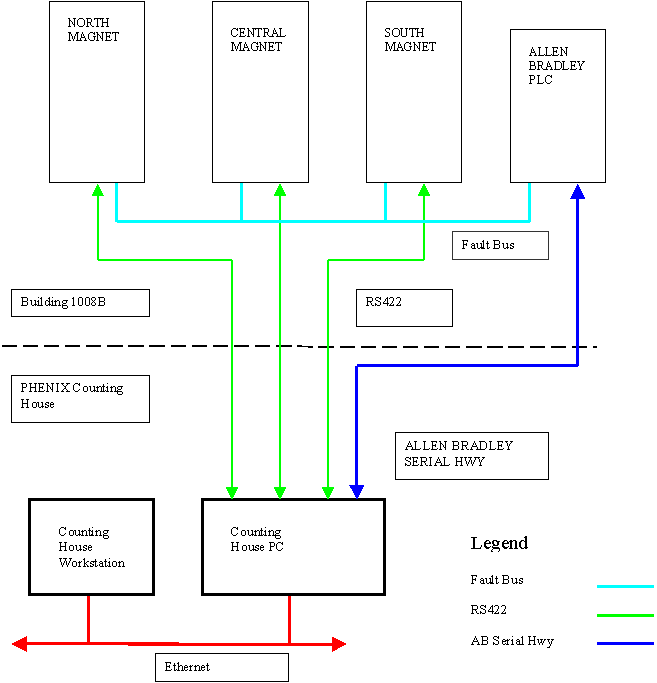
The following is a diagram of the Main Magnet system components and their interconnections.
FAULT SYSTEM INTERFACE
The main magnet power supplies are connected to an external fault monitoring system which is maintained by the AGS controls group. This system monitors the magnet water supply, temperature Coil measurements and interlock system. This system is connected to the magnet power supply fault bus by hardwire connections. The PHENIX magnet control PC can read faults which are monitored by the Allen Bradley system through an Allen Bradley serial highway. An interface for this bus is installed in the control PC and a serial highway cable runs from the PC to the Allen Bradley crate which is located in building 1008B. The monitord signals is contained in the table below.
North Magnet
|
SIGNAL |
Quantity |
Wired to PS bus |
Readout format |
Range |
|
Klixon |
8 |
Yes |
Int |
|
|
Thermisters |
8 |
No |
int |
0 - 200 deg F. |
|
voltage |
8 |
Yes |
Int |
0 - 12.4 volts |
|
Water mats |
2 |
No |
On / off |
1 = ok 0 = tripped |
|
|
|
|
|
|
|
|
|
|
|
|
Central Magnet
|
SIGNAL |
Quantity |
Wired to PS bus |
Readout format |
Range |
|
Klixon |
24 |
Yes |
Int |
|
|
Thermisters |
24 |
No |
int |
0 - 200 deg F. |
|
voltage |
12 |
Yes |
Int |
0 - 12.4 volts |
|
Water mats |
2 |
No |
On / off |
1 = ok 0 = tripped |
|
|
|
|
|
|
|
|
|
|
|
|
South Magnet
|
SIGNAL |
Quantity |
Wired to PS bus |
Readout format |
Range |
|
Klixon |
24 |
Yes |
Int |
|
|
Thermisters |
24 |
No |
int |
0 - 200 deg F. |
|
voltage |
12 |
Yes |
Int |
0 - 12.4 volts |
|
Water mats |
2 |
No |
On / off |
1 = ok 0 = tripped |
|
|
|
|
|
|
|
|
|
|
|
|
W/C Buss and Power supply Water
|
SIGNAL |
Quantity |
Wired to PS bus |
Readout format |
Range |
|
Klixon |
|
Yes |
Int |
|
|
Thermisters |
|
No |
int |
0 - 200 deg F. |
|
voltage |
|
Yes |
Int |
0 - 12.4 volts |
|
Water mats |
No |
On / off |
1 = ok 0 = tripped |
|
|
|
|
|
|
|
|
|
|
|
|
|
Allen bradley System interface
The interface between the Online system and the Allen Bradley PLC consists of a Allen Bradley (AB) serial highway 1784-KTX PCI Communication interface card which resides in the Online control PC.
In addition a software driver for this card was purchased from AB which provides a COM based set of API functions for access to the AB serial highway and the memory of the PLC controller. Communication between the AB and the Online computer take place by the PLC controller placing readable parameters in the PLC memory and the Online computer reading them out. There is an agreed upon memory mapping for parameters which are to be read out by the Online controller.
Magnet Hardware Interface Configuration
RS 422 Cable Pin Connections
|
Magnet Controller |
PC |
||
|
DB9 Male |
DB9 Female |
||
|
Pin # |
Pin # |
||
|
|
|
||
|
RxH |
1 |
RxH |
1 |
|
RxL |
2 |
RxL |
2 |
|
TxL |
3 |
TxL |
3 |
|
TxH |
4 |
TxH |
4 |
|
Gnd |
5 |
Gnd |
5 |
Magnet Controller RS422 Serial Board Jumper Settings
The following table shows the which pins are connected together on the
InvarPower Serial Communication board.
|
Jumber Number |
Pin |
Pin |
|
J22 |
3 |
1 |
|
J22 |
4 |
2 |
|
J23 |
3 |
1 |
|
J23 |
4 |
2 |
PC RS422 Communication Board
The PC RS422 communication is handled by a PCI based Ultra COMM 422 Serial Communication Board. This single board has 4 RS422 ports. Ports 0, 1 and 2 are connected to the North , Central and South Magnets respectively.
Online Control Application
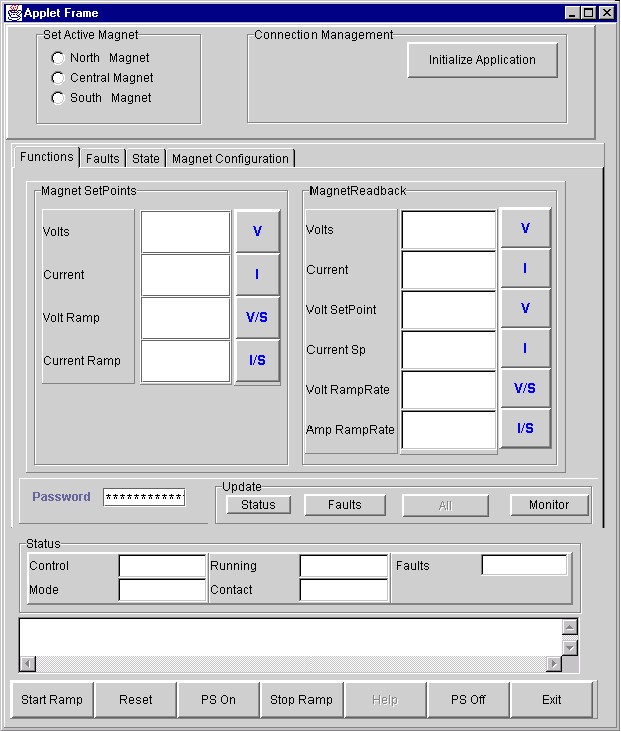
A Java based control interface was written to control and monitor the 3 main magnets. This application may be executed on any machine on which a Java Virtual Machine has been installed. The application allows the user to select any one of the three main magnets for control and monitoring. The selected magnet will then update the display fields for magnet output and setpoint current, voltage and ramp rate values. Fault and status flags are also monitored. All monitored values are updated every 5 seconds.
If a fault occurs a fault dialog box can be displayed to show the individual fault values.
Future upgrades will automatically log the monitored values for all magnets as well as fault occurrences in the PHENIX online database. The application may be invoked by executing the command magnetviewer for the online executable directory. This directory is identified by the environment variable "ONCS_BIN' on phoncs0.phenix.bnl.gov.
The following diagram shows the magnet control application.
MAIN MAGNET CONTROL INTERFACE
Central Magnet Fault Dialog Display